
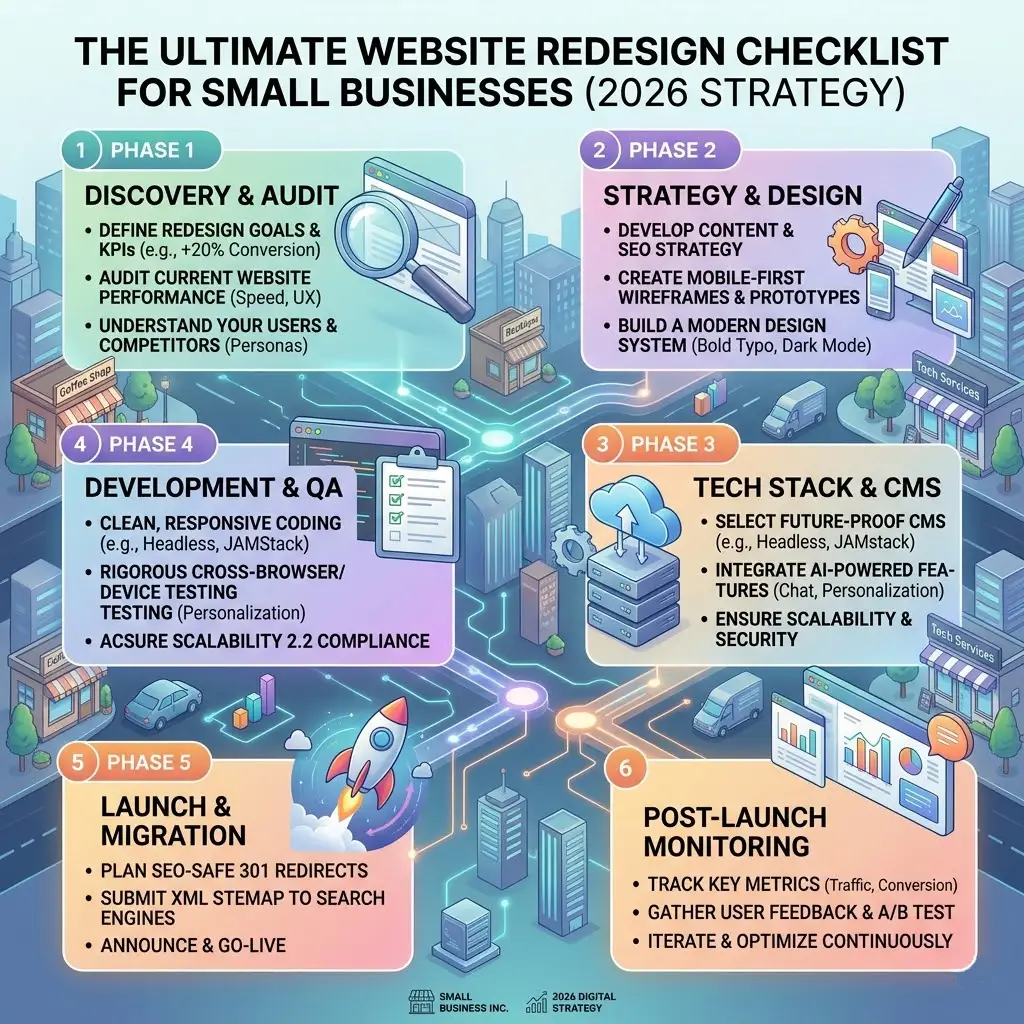
Is your business website a high-performing digital storefront, or is it acting as an expensive digital paperweight?
For small businesses, a website redesign isn’t merely an aesthetic upgrade or a superficial paint job. It is a calculated infrastructure overhaul designed to turn casual browsers into paying customers. If your current site suffers from slow loading speeds, confusing navigation, or falling conversion rates, you are actively leaking revenue to competitors.
To ensure your investment delivers tangible business growth, you must approach the process systematically. This step-by-step framework covers every phase of a small business website redesign to prevent traffic drops, preserve SEO equity, and maximize lead generation.
Phase 1: Audit Your Current Performance Benchmarks
Never initiate a redesign blindly. You must document your starting technical baselines so you can measure your post-launch return on investment (ROI).
-
Export Traffic Data: Use Google Search Console and Google Analytics 4 (GA4) to identify your top-performing landing pages. You must know which URLs generate organic impressions and clicks so you don’t accidentally delete them during structural updates.
-
Analyze Conversion Roadblocks: Run a user experience (UX) audit to pinpoint exactly where users drop off. Are they abandoning your checkout process, or leaving your contact form halfway through?
-
Audit Technical tracking: Check your Google Tag Manager (GTM) data layer to verify that lead forms, phone number clicks, and button interactions are tracking correctly.
Phase 2: Define Clear Conversion Goals and UX Wireframes
A beautiful layout means nothing if it fails to convert visitors into inquiries. Design architecture must always follow business function.
1. Simplify Navigation Paths
Keep your primary menu clean. A standard small business architecture should point directly to core service pillars:
-
Homepage
-
Services (e.g., Custom Development, SEO, Branding)
-
Case Studies / Results
-
About / Team
-
Contact Us
2. Implement Strategic UI/UX Directives
Place your primary Call to Action (CTA)—such as “Book a Free Audit” or “Request a Quote”—prominently in the top-right corner of your sticky header. Ensure that your mobile layout scales flawlessly; over 60% of B2B and consumer web interactions originate on mobile viewports.
Phase 3: The Technical SEO Preservation Matrix
The single biggest mistake businesses make during a redesign is failing to protect their existing organic rankings. When you alter URL paths without a technical migration plan, Google displays indexing errors, causing your search traffic to plummet.
The Infallible Migration Rules:
-
Map 301 Redirects: If a URL path changes (e.g., from
/our-services/to/web-development/), deploy a permanent 301 redirect script on your server immediately. This transfers your hard-earned SEO authority smoothly to the new page. -
Maintain Meta Architecture: Keep your high-performing title tags and meta descriptions intact unless you are purposefully optimizing them for newly targeted long-tail search phrases.
-
Update XML Sitemaps: Generate a clean, updated
.xmlsitemap post-launch and submit it immediately within Google Search Console to trigger rapid recrawling.
Phase 4: Performance Optimization and Core Web Vitals
Google highly prioritizes fast websites. Slow loading speeds degrade user experience, decrease conversion rates, and lower your search rankings.
-
Compress All Media Assets: Avoid uploading raw, unoptimized images. Convert your visual assets into modern WebP or AVIF formats to reduce image sizes by up to 70% without sacrificing visual fidelity.
-
Minify Codebases: Clean up system styles and logic by minifying CSS, JavaScript, and HTML elements. Eliminate redundant theme frameworks or unused third-party plug-ins.
-
Optimize Core Web Vitals: Ensure your site meets strict search engine requirements:
-
LCP (Largest Contentful Paint): The main visual layout must load in under 2.5 seconds.
-
INP (Interaction to Next Paint): The site must respond immediately to user clicks.
-
CLS (Cumulative Layout Shift): Visual components must remain stable while loading to prevent accidental clicks.
-
Phase 5: Pre-Launch QA Testing Checklist
Run through this quality assurance checklist before flipping the switch to point your live domain to the new layout:
-
Cross-Browser Verification: Test functionality on Chrome, Safari, Edge, and Firefox.
-
Mobile Touch Optimization: Ensure all forms, buttons, and close icons are easily clickable on touchscreens without layout errors.
-
Forms and Automation Check: Submit test entries through every contact form to confirm data flows correctly to your email inbox or CRM system.
-
SSL Security Protocol: Verify your HTTPS security certificate is active and configured correctly.
FAQ Block
How much does a website redesign cost for a small business?
Website redesign costs vary significantly depending on customization, functionality, and scope. A basic informational site built on a template framework can range from $1,500 to $4,000. Conversely, a completely custom, high-performance web platform or e-commerce solution tailored for lead generation ranges from $5,000 to over $15,000 depending on integration complexity.
How long does a standard business website redesign take?
A standard small business website redesign typically takes between 4 to 8 weeks from initial discovery and wireframing to development, content integration, and final testing. Complex custom software builds or enterprise applications with deep internal database systems can extend timelines to 12 weeks or more.
Will a website redesign cause me to lose my Google search rankings?
If executed properly with a precise technical migration strategy, a redesign will not hurt your SEO. However, if you alter URL paths without setting up permanent 301 redirects, alter metadata recklessly, or fail to re-submit your new sitemap, you will experience a sharp decrease in organic traffic.
Elevate Your Business Digital Platform
A website redesign is a comprehensive business optimization strategy. Partnering with a skilled, technical development team protects your existing search authority, eliminates underlying system bugs, and creates an optimized interface that systematically grows your company’s pipeline.
Ready to turn your website into a powerful business engine? Let’s build a fast, secure, high-converting digital presence tailored for your brand. Contact Orange Dot Tech today to schedule your professional UI/UX and website audit.